Running balance
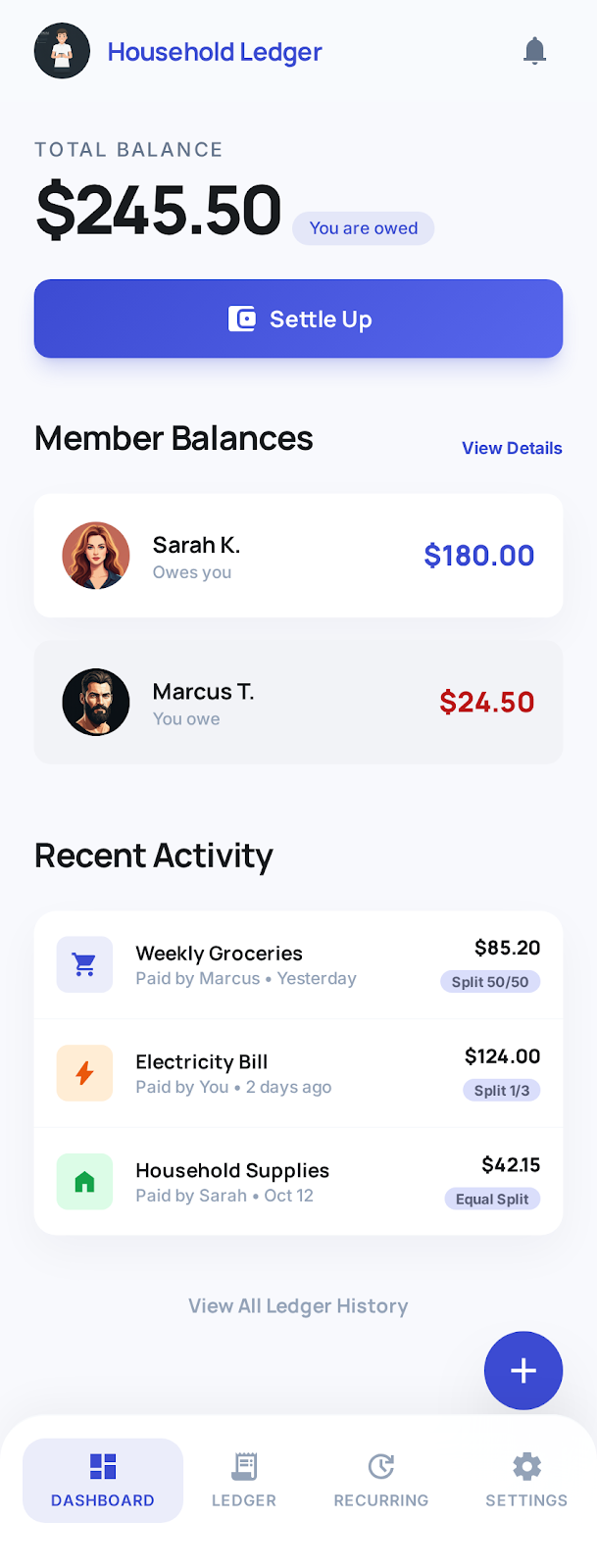
See who is ahead at a glance with a clear banner and settle-up-friendly totals—updated as you add or edit expenses.
OurTab.US
One shared household ledger for couples and roommates—who paid what, recurring bills, settle-up. Free to start, no card required.
Everyone sees the same numbers in real time. When you are ready, Pro bank sync pulls transactions into My Ledger so shared expenses land with less typing.
Try demo How it works Features Free vs Pro Get started
Your household data is encrypted in transit and at rest. We do not sell your data to third parties.
Built around the shared “our” in OurTab—everyone sees the same numbers.
One shared space for expenses and balances—name it and you are ready.
Send a secure invite link. They join the same ledger—up to five members.
Add expenses by hand, or (on Pro) scan a receipt and pull bank lines into My Ledger and share them to the house. Balances update for everyone.
Tap once to add a sample line—see how quick logging feels before you sign in.
Everything lives in one place so you spend less time reconciling and more time living together.
See who is ahead at a glance with a clear banner and settle-up-friendly totals—updated as you add or edit expenses.
Log one-time purchases with categories, who paid, and shared or individual splits. Edit, settle, or remove entries anytime.
Track rent, subscriptions, and bills on monthly, yearly, or custom intervals—including terms and reminders of what repeats.
Multiple households, optional defaults, and invite links so partners or roommates join the same shared space securely.
Month or all-time views with spending by category, plus CSV and PDF monthly reports you can save or share.
On Pro, link supported banks with Plaid. Transactions land in your private My Ledger—share the ones that belong on the house ledger.
Start free. Upgrade when you want bank sync to cut the manual entry.
$0
Everything you need for a shared household ledger.
Optional paid plans
Go autopilot with secure bank linking. Plan options and pricing show in the app after sign-in.
Yes. Core household ledgers, invites, recurring expenses, summaries, settle-up, and exports are free. Optional Pro plans unlock bank sync (Plaid), My Ledger, and receipt scan—see plans in the app after sign-in.
Pro links supported bank accounts through Plaid. Eligible transactions appear in your private My Ledger. You choose which ones to add to the shared house ledger—so the household stays transparent without dumping every personal purchase.
No. Create a household and invite partners with the free ledger. You only enter payment details if you choose a Pro plan for bank sync.
Yes. The OurTab iOS app is available free on the App Store. The web app also works great on mobile—add it to your home screen for a full-screen experience. Your data syncs across all your devices.
Up to five members per household—enough for couples, roommates, or small shared homes.
No. We do not sell your financial data to third parties. Bank connections use Plaid; you can disconnect anytime. Export your ledger to CSV or PDF whenever you like.
You can read our Privacy Policy and Terms of Service anytime.
Stored only in this browser session.
Bank transactions stay private here. Use Add to house ledger to share a line with this household.
Adding transactions to the household ledger from My Ledger (and syncing from your bank) requires an active paid plan for this household.
This household does not have an active Pro plan. Upgrade to sync from your bank and share lines to the household ledger.
Bank and credit card transactions can take 4 or more hours to appear, depending on your institution.
You subscribed to Pro for this household. Update payment method, view invoices, or cancel from the billing portal.
Choose a plan for this household. Bank linking and sync apply to the member who connects accounts.
Your previous plan is no longer available. Choose a current plan below.
Loading plans…
Comma or new line separated categories that should never be added to household ledger.
Open a ticket for this household. We email you when we reply or when the ticket status changes.
Account removal uses a separate flow. Open Data deletion in your browser to submit a request.
Shown for the household you have selected in the app header.
Common questions and answers. Content is loaded from our servers when you open this tab.
Set each member's display name and role (Person A, B…) on the Users tab. Roles are tied to each account and won't disappear.
Match your device, or choose light or dark. Syncs with your household settings when you save.
Get alerts for new expenses, invites, and a monthly settle-up reminder. You can change which types you receive.
No phone number on this account yet. US numbers only (+1). Optional — for your profile; Pro accounts use SMS two-step verification at sign-in.
View and reply to tickets on the Support tab, or use the public support page.
Support pageIf you added OurTab to your home screen or something looks wrong after an update, clear the cached copy and reload.
Tap a month to open that summary and settle up.
Check spam, Promotions, and Updates. Search for verify or Firebase; the sender is often noreply@…firebaseapp.com.
If the link expired, use Resend.
Paid households require a verified mobile number for sign-in. US numbers only (+1).
This site is protected by reCAPTCHA and the Google Privacy Policy and Terms of Service apply.
We will text a code to your phone.
This site is protected by reCAPTCHA and the Google Privacy Policy and Terms of Service apply.
US mobile numbers only. Enter 10 digits (we add +1).
This site is protected by reCAPTCHA and the Google Privacy Policy and Terms of Service apply.
